
Medical Coordination Tools
An oncology MDT works through a long series of cases in a single sitting. Radiologists, oncologists, surgeons, and histopathologists must simultaneously access DICOM images of several gigabytes, histopathology reports, and biological assessments: often dispersed between the trust’s EPR, the regional PACS, and scanned paper documents from patients referred from other institutions.
The clinician presenting the case loses time on each case searching, opening, and zooming in on the correct slice. Case after case, part of the meeting evaporates in technical manipulation. Meanwhile, the specialists wait, check their emails, and mentally disengage. Decisions are made, but the structured report: the one that must feed into the DCC and justify the care pathway to the ARS, the regional health authority: is hastily drafted after the meeting, sometimes the following day.
And when a patient has been discussed at another trust within the ICS, retrieving the record of that MDT is akin to archaeology.
This solution belongs to the Business Operations & ERP family.
Challenges holding back your performance
Teams are improvising. Screen sharing via a video-conferencing tool on a saturated hospital connection, DICOM images converted to JPEG to fit in an email, reports typed in a word processor then copied and pasted into several different systems. Some establishments use consumer videoconferencing tools: without encryption guarantees compliant with HDS requirements, without traceability of patient data access.Legacy MDT platforms impose archaic interfaces and cannot handle heavy images in real time.Result: practitioners circumvent the official tool, create consumer messaging groups for urgent cases, store screenshots on their personal phones. GDPR compliance becomes theoretical.
Our Technical Approach
Our approach stems from a fundamental observation: an MDT is not an enhanced videoconference, it is a medico-legal workflow with real-time visualisation constraints.
We build around a DICOM Web viewer capable of streaming large image series without prior download: the radiologist annotates, others see instantly. End-to-end encryption covers the entire chain: from the shared file before the meeting through to the report generated automatically from decisions taken during the session.
Consent management is natively integrated: the system knows which documents may be shared with which participants according to patient authorisations. Asynchronous messaging enables preparation of cases in advance, with notifications to relevant specialists. Identity federation relies upon existing directories: no new password to manage for practitioners who already have fifteen.
DICOM Web Viewer
Display of MRIs or CT scans directly in the browser without loss of quality.
End-to-End Encryption
Only participating physicians possess the decryption key for the file.
Medical Coordination Tools Report Generation
Collaborative drafting and electronic signature of the therapeutic decision.
Management of Consents
Strict traceability of the patient’s consent for sharing of their medical record.
Asynchronous Messaging
Secure discussion channel, compliant with healthcare requirements, for meeting preparation.
Identity Federation
Connection via Pro-Santé Connect or hospital directories (CPS).
Technical Architecture
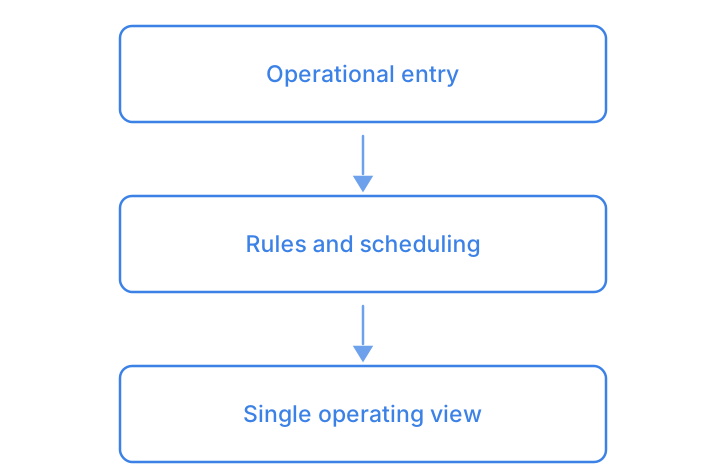
Enter once, let the rules schedule, read a single view: this foundation is shared across the family — you will find it in Order Management System (OMS) and in Workshop & After-Sales Management.
- DICOM Web ViewerDisplay of MRIs or CT scans directly in the browser without loss of quality.
- End-to-End EncryptionOnly participating physicians possess the decryption key for the file.
- Medical Coordination Tools Report GenerationCollaborative drafting and electronic signature of the therapeutic decision.
- Management of ConsentsStrict traceability of the patient’s consent for sharing of their medical record.
- Asynchronous MessagingSecure discussion channel, compliant with healthcare requirements, for meeting preparation.
- Identity FederationConnection via Pro-Santé Connect or hospital directories (CPS).
Smooth and frictionless integration
The tool connects to the EPR via HL7 FHIR or your vendor’s specific connectors. The PACS remains your PACS: we query, we do not duplicate. Authentication is handled through your institutional directory or the regional federation if one exists. Deployment begins with a pilot speciality, often digestive or thoracic oncology, on a limited scope.
Long enough to validate real-world usage before expanding.
RCP Flow Mapping
Audit of specialities, volumetrics, current tools, friction points identified with MDT coordinators.
Mock-up on a pilot MDT
Deployment over a weekly meeting, with adjustments as actual usage settles in.
Integration of Electronic Health Records and PACS
Connection to existing systems, load testing on large images, security validation with the IT Department.
Progressive deployment
Extension to other MDTs in waves, coordinator training, documentation of procedures.
Measurable results for your organisation
- Case presentation time markedly reduced, with the material already assembled
- Structured report available in the EPR as soon as the meeting ends
- Patient data access traced and auditable
- Zero patient documents transmitted through unsecured channels
- External specialist participation made easier by simplified remote access
- Documented HDS and GDPR compliance for ARS certifications and audits
Clarifying your decision-making
How do you manage the independent practitioners who participate in MDTs without being in our directory?
The identity federation accepts several sources. For independent practitioners, Pro Santé Connect can serve as the entry point, or guest accounts with enhanced authentication. Each access remains named and logged, whatever the practitioner’s status.
Our radiologists are already using their PACS workstation; they will not change tools in the middle of an MDT.
The web viewer is for collective presentation, not for diagnosis. The radiologist prepares on their usual workstation, then shares through the interface so every participant sees the same image without latency. The two uses are complementary.