
Staffing & Resource Allocation Software
In an ESN, consultancy firm, or engineering company, profitability hinges on each assignment. When a senior consultant remains on the bench, gross margin evaporates. When a junior profile is deployed on a mission beyond their capabilities, it results in a disgruntled client and an eroding reputation. Between ongoing pre-sales activities, mission endings to anticipate, leave, mandatory training, and individual preferences, staffing becomes a daily puzzle.
Managers spend their Monday mornings cross-referencing files, ringing practice directors, and negotiating resources. Decisions are often made at the last minute, under pressure, with partial visibility. The sales representative promises a start date without knowing whether the profile will actually be available. The delivery manager discovers a scheduling conflict on Friday evening.
Meanwhile, nobody truly knows what the actual utilisation rate is, nor which skills are missing to respond to current tenders.
This solution belongs to the Business Operations & ERP family.

Challenges holding back your performance
The spreadsheet remains the default staffing tool in many organisations. Each manager maintains their own version, with their own colour conventions and their own approximations. The HRIS systems on the market manage leave, not project assignments. ERPs offer planning modules designed for industry, not for intellectual services with variable parameters.Result: nobody has the same view of actual availability. Profile searches are conducted from memory and through internal networks. A consultant with the right certification but attached to another business unit remains invisible. Capacity conflicts are discovered too late, forecast margins are calculated retrospectively, and recruitment or subcontracting decisions are made blindly.
Our Technical Approach
Our approach stems from a key observation: staffing is not a planning problem, it is a decision-making problem under multiple constraints.
We build a visual planning interface: capacity Gantt chart: which aggregates availability, skills and contractual commitment data in real time. Behind this interface, a matching engine interrogates the skills repository to suggest relevant profiles according to the requirements criteria: certifications, sectoral experience, location, client history.
The system also models pre-sales activities with their conversion probability, to anticipate requirements over the coming months. Each potential assignment triggers a forecast margin calculation incorporating the negotiated daily rate, the employee’s loaded cost and estimated travel expenses. Assignment requests circulate via workflow, with hierarchical validation and automatic conflict detection.
The objective: to provide decision-makers with a consolidated and reliable view, not another tool to complete.
Global Capacity Gantt Chart
Immediate visualisation of team utilisation by Business Unit or by grade.
Skills Matching Engine
Filtered search: “senior DevOps developer, available half-time from June, certified on your cloud platform”.
Scheduling Conflict Management
Visual alert in the event of over-allocation (Overbooking) of a member of staff.
Modelling of Pre-Sales
Reservation of pre-allocated resources on the most advanced opportunities.
Provisional Margin Calculation
Cross-referencing of contract daily rates and actual salary costs to project profitability.
Staffing & Assignment Requests
Process digitising a project manager’s request to the resource manager.
Technical Architecture
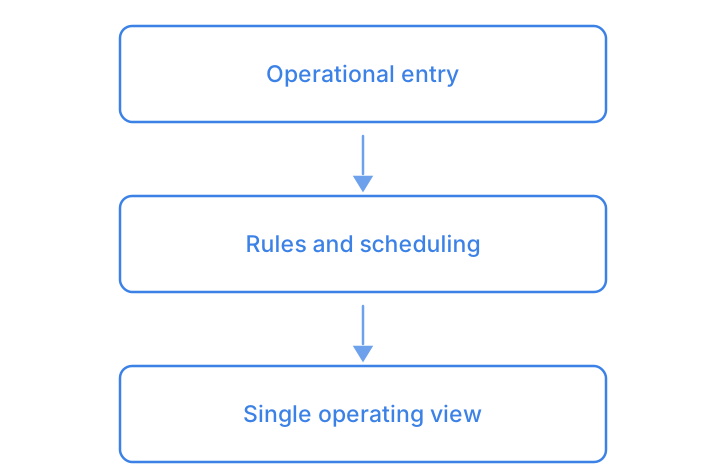
Enter once, let the rules schedule, read a single view: this foundation is shared across the family — you will find it in Property Management Systems (PMS) and in Order Management System (OMS).
- Global Capacity Gantt ChartImmediate visualisation of team utilisation by Business Unit or by grade.
- Skills Matching EngineFiltered search: “senior DevOps developer, available half-time from June, certified on your cloud platform”.
- Scheduling Conflict ManagementVisual alert in the event of over-allocation (Overbooking) of a member of staff.
- Modelling of Pre-SalesReservation of pre-allocated resources on the most advanced opportunities.
- Provisional Margin CalculationCross-referencing of contract daily rates and actual salary costs to project profitability.
- Staffing & Assignment RequestsProcess digitising a project manager’s request to the resource manager.
Smooth and frictionless integration
The tool connects to your existing HRIS to retrieve absences and employee data: no duplicate entry required. Project information comes from your CRM or ERP via API or structured import. We work with competency frameworks already in place, enriching them progressively as needed. Deployment is carried out in waves: first a pilot business unit, then rollout.
Managers retain their usual reading habits; it is the data feed and reliability that changes.
Current Flow Mapping
Audit of staffing practices by BU, identification of reliable data sources and daily friction points.
Modelling of the repository
Structuring of skills, levels and certifications in alignment with your business vocabulary and commercial requirements.
Pilot deployment
Production deployment on a BU with 30-50 consultants, adjustments to matching rules and validation workflows.
Extension and optimisation
Progressive rollout to other entities, refinement of algorithms according to field feedback, training of new users.
Measurable results for your organisation
- Time spent in staffing meetings markedly reduced
- Consultant utilisation rate improved
- Scheduling conflicts detected before the assignment starts
- Visibility on forecast margins from the pre-sales stage
- Qualified profiles found immediately, from the skills repository
- Fewer unsuitable assignments reported by clients
Clarifying your decision-making
How can we ensure that consultants update their skills in the system?
The skills repository is enriched by project data rather than by consultants’ goodwill: each completed assignment automatically adds its technologies and contexts to the profile. Manual updates remain possible, but the tool works even if no one fills anything in.
Our BU managers each have their own methods — how can we avoid resistance?
Deployment of a staffing tool starts with a pilot involving volunteer managers, often those suffering most from the current arrangement. The others follow once they see colleagues saving time. No one is forced to abandon their spreadsheet overnight.