
Clienteling Applications
In retail, your sales advisers face an absurd situation: they know their regular customers by heart, but have no means of transmitting this knowledge to their colleagues. When a customer returns months after hesitating over a sofa, the salesperson who greets her starts from scratch. Worse still: with shop floor turnover, this collective memory constantly evaporates.
At head office level, you have invested in a CRM, a loyalty programme, perhaps even marketing automation.
But this data remains trapped in back offices, inaccessible at the crucial moment: when the customer is there, in front of the salesperson. Your field teams juggle between the till to consult purchase history, their personal phone to retrieve a messaging exchange with a customer, and their memory for the rest. The result: a fragmented customer experience when you have all the data to do better.
And frustrated salespeople who know they could offer a better service if they had the right information at the right moment.
This solution belongs to the CRM & Customer Relations family.
Challenges holding back your performance
Traditional attempts fail on the same obstacle: they are not designed for the pace of the shop floor. Corporate CRM? Too slow, too complex, designed for B2B sales representatives who have time for each appointment: not for an adviser handling one interaction after another all day. Shared spreadsheets?They quickly become a graveyard of obsolete information that no one updates. Notes on personal smartphones? Impossible to share, and it raises obvious GDPR issues. As for the ’clientelling’ modules of major retail suites, they often require a complete replacement of your existing stack: a long project with a heavy budget.Result: your sales staff continue to muddle through, and the gap widens with retailers that have successfully put customer data in the hands of their shop floor teams.
Our Technical Approach
Our approach stems from a simple observation: the tool must adapt to the salesperson’s gesture, not the other way around. We build a tablet interface designed to be taken in at a glance, between two customers. One screen, one search, the essential information. The customer view aggregates what already exists with you: till history, loyalty programme, e-commerce exchanges, after-sales returns: without creating yet another database to maintain.
Product recommendations are based on real affinities observed in your sales, not on generic algorithms. Appointment booking and messaging allow the relationship to be extended beyond the visit, but remain optional: we don’t force usage if your teams don’t need it. Each shop can have its configuration according to its customer flow and level of maturity.
The history of exchanges belongs to the brand, not to the individual salesperson: when someone leaves, the knowledge remains.
Client 360° View
Consolidation of web and store data in a clear and visual profile.
Recommendation Engines
Complementary item suggestions based on profile and styling rules.
Appointment Scheduling
Personalised in-store visit appointment management tool.
Client Messaging
Secure sending of suggestions by SMS or messaging directly from the tablet.
Quick Search
Stock availability search across other stores in the network.
Intervention History
Monitoring of repairs or alterations in progress for valuable pieces.
Technical Architecture
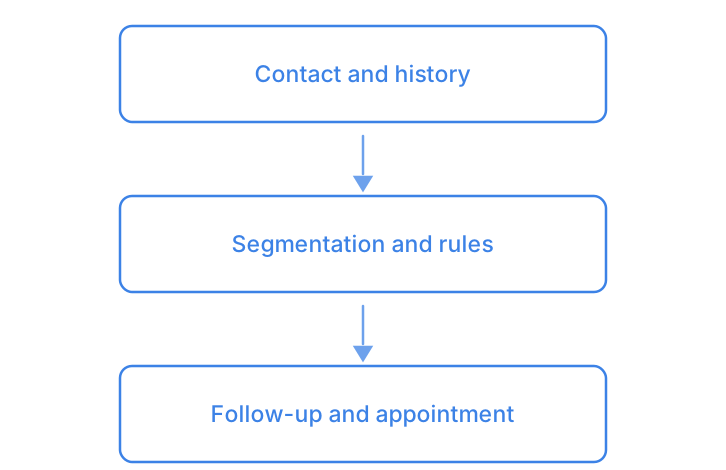
A complete history, segmentation rules, a follow-up at the right moment: Automotive CRM & Lead Management and Donor CRM & Tax Receipts follow this logic.
- Client 360° ViewConsolidation of web and store data in a clear and visual profile.
- Recommendation EnginesComplementary item suggestions based on profile and styling rules.
- Appointment SchedulingPersonalised in-store visit appointment management tool.
- Client MessagingSecure sending of suggestions by SMS or messaging directly from the tablet.
- Quick SearchStock availability search across other stores in the network.
- Intervention HistoryMonitoring of repairs or alterations in progress for valuable pieces.
Smooth and frictionless integration
We integrate with your existing systems: till, CRM, e-commerce, loyalty programme. No data migration, no double entry. Deployment is carried out shop by shop, beginning with a pilot across 2-3 volunteer outlets. Your IT teams retain control over data flows and access rights.
We work with your existing APIs where they exist, we create simple connectors where there are none. Allow a few weeks between the first workshop and the first tablets in-store.
Mapping of existing data
We identify what already exists in your systems (till, loyalty, e-commerce) and what is missing. No unnecessary slides.
Prototype with a pilot store
We deploy an initial version in 2-3 volunteer stores. Sales staff test the system, and we adjust the interface and displayed data according to their feedback.
Integration of workflows and training
Permanent connection to your systems, field team training on the shop floor, implementation of monitoring indicators.
Progressive deployment and optimisation
Store-by-store rollout according to your timeline. We analyse actual usage patterns to enhance recommendations and simplify barriers to adoption.
Measurable results for your organisation
- Customer history reached immediately, from the tablet
- Average basket up on identified customers
- Appointments booked through the tool convert better
- New associates onboarded faster through immediate access to history
- Better retention among customers followed over time
- Adoption by sales teams supported by a tool usable on the shop floor
Clarifying your decision-making
Our sales assistants are already struggling with current tools, how can we guarantee they will use this one?
Two or three sales assistants are involved from the design stage so the tool matches their actual gestures. The interface is designed to be mastered straight away. Adoption is measured from the first weeks: if a shop falls behind, adjustments come before it becomes a problem.
We already have a CRM — why not simply train our teams on it?
A CRM is excellent for commercial management, less so for use on the shop floor. The clienteling application connects to it to retrieve and enrich data, but its interface stays tuned to the assistant’s context: standing, between two customers, at a glance. The two tools coexist, each in its role.